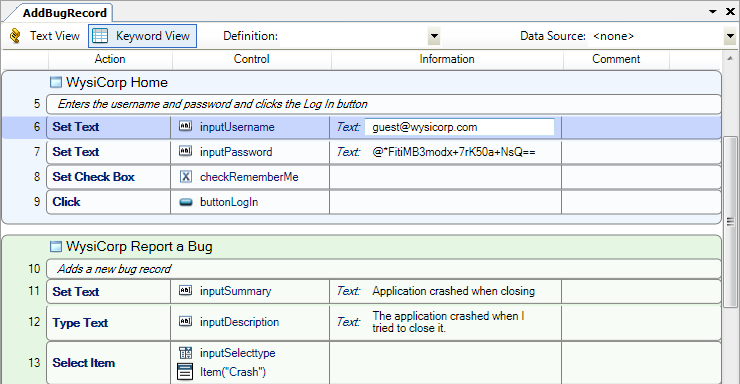
Keyword View displays scripts in a grid format. Each script line is a statement, which specifies how QA Wizard Pro interacts with the tested application.
Tip: If you are a new QA Wizard Pro user, you may want to work in Keyword View to become familiar with the program.
Actions are grouped by the window they are performed on. The following information is displayed in the rows and columns.
| Column name | Description |
|---|---|
| # | Script step number; corresponds to the line number in Text View |
| Action | Statement that is performed |
| Control | Control the action is performed on; not displayed when viewing load test scripts |
| Information | Statement information, such as arguments |
| Comment | Script step comments |
Use the GUI statement editor to work with statements in Keyword View. To add a statement, choose Script > Add Statement. To edit a statement, choose Script > Edit Statement.
Tip: You can also edit arguments directly in Keyword View. Click an Information cell and enter the value.
    |

|
 See also